
Plants vs Brainrots 2D — free online game
Plants vs Brainrots 2D
6.4 / 10
Loading...
Plants vs Brainrots 2D — free online game
Plants vs Brainrots 2D
Don't like this game?
Tell us why
Continue on your phone
Scan the QR code to open this game on your mobile device
How to play
Plants vs Brainrots 2D — free online game

Play Plants vs Brainrots 2D Online — Free Browser Game

Rating
6.4 (11 votes)
Technology
HTML5
Platform
Browser (desktop, mobile, tablet)
Screen Orientation
Landscape
Release
April 2026
Last Update
April 2026
Name
Plants vs Brainrots 2D
Category
Strategies & Management

About Plants vs Brainrots 2D — Gameplay & Story

Plants vs Brainrots 2D — 2D tower defense with elements Italian brainrot You place plants on a grid and destroy waves of flying brainrots with huge health bars. Similar chaotic gameplay Plants vs Zombies Fusion Mode Available on PC, smartphones and tablets.

Basic gameplay

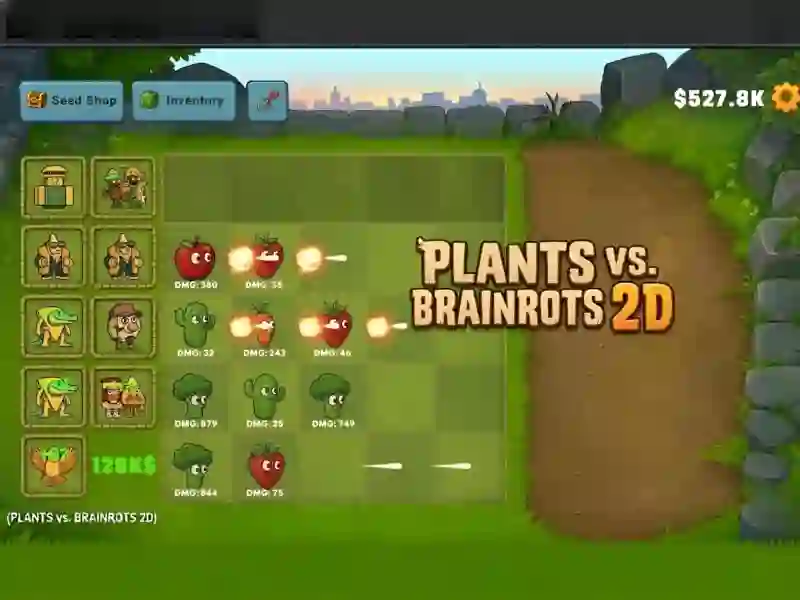
Plants attack automatically — you just place and improve them. Brainrots fly horizontally in waves. They do not attack plants in response — the whole difficulty lies in their health. Regular enemies fall quickly. Legendary bosses can withstand thousands of damage. Your task is to have time to pump up the damage before the bosses appear. The screen is filled with projectiles, damage numbers, and explosive effects. This Plants vs zombies — but faster, more chaotic and with meme characters.

What to do

Place plants on the battle grid. Earn dollars for killing enemies. Spend them on seeds in the store and permanent bonuses to damage. Defeat 3 Legendary Brainrots before they fly off the screen.

Levels and goals

Progress comes through waves of enemies. Each wave is more difficult. The main goal is 3 legendary bosses with millions of HP. Progress is saved in the browser cache automatically. No account needed.

How to play

  1. Drag a plant from the deck onto a grid cell. It will start attacking automatically.
  2. Keep an eye on the DMG numbers under each plant. They show real damage.
  3. Unlock rare plants in the Seed Shop. They provide significantly more DPS.
  4. Before the 2nd legendary boss appears, spend all dollars on damage multipliers (4X icons).
  • Lifehack 1: Arrange plants in several lines at once. Bosses fly all over the screen — one line will not cover their path.
  • Lifehack 2: Don’t waste dollars on the first waves. Legendary bosses have millions of HP — accumulate multipliers in advance.

Play Plants vs Brainrots 2D for free — without installation on your PC or smartphone, right in your browser!

SGameS is waiting for you Steal Brainrot Duel, Plants vs Zombies Fangame Demo And Mutant Plants Vs Zombies — play right now!

Platform

Browser Desktop , Mobile and Tablet

Release

21 april 2026

Last Update

21 april 2026

How to play

PC:

  • LMB — select / place a plant
  • E/click — store

Smartphones/tablets:

  • Tap — select / put
  • Tap/swipe — menu and shopping

FAQ — Frequently Asked Questions

What is Plants vs Brainrots 2D about?

This is a 2D tower defense game where plants are automatically attacked by waves of flying brainrots. The main goal is to defeat 3 legendary bosses with millions of HP before they fly off the screen.

What genre does this game belong to?

Tower defense with elements of auto-combat and leveling up. The visual style is bright pixelated 2D with meme characters from internet culture.

Who is it for?

For casual players from 10 years old. A simple start without training is suitable for beginners. The damage multiplier system and legendary bosses keep experienced players busy.

What makes it interesting?

Plants don't die — the whole difficulty is in the speed of pumping. Legendary bosses with millions of HP make every upgrade critical.

Is the game available on mobile devices?

Yes. The game runs directly in the browser of your smartphone or tablet. There is no need to download anything.

Is the game free?

Yes. Plants vs Brainrots 2D is free to play on SGameS. The game runs directly in the browser without installation.

Is there a full screen mode?

Yes. Click the full screen button in the game interface. Available on PC and tablets.

Is progress saved in the game?

Yes. Progress is saved automatically in the browser cache. No account or registration required.

My games